Showing posts with label set top box. Show all posts

Friday, 30 January 2015

BBC iPlayer add-on for Kodi, and Channel 4's 4oD

After being stopped by BBC several months ago, I've just noticed that the BBC iPlayer add-on for Kodi is working again. I can now watch live BBC TV and access all iPlayer's catch-up recordings via this add-on.

This is good news as I no longer have to access it via browser - the Kodi addon works so well and is far easier to navigate and find programmes than BBC's own iPlayer web site.

If only Channel 4 would allow such third party access to their 4oD service, too. I appreciate it is available on Windows PCs, iOS, Android, some games consoles, Smart TVs and set top boxes, but Channel 4's use of DRM restricts access to viewing via one of these devices. So, my only way of accessing 4oD is via Android - not a great viewing experience! Come on Channel 4, please open up http://m.channel4.com/4od/ once again so that third party 4oD apps can work again. I've tweeted Channel 4 with this request and on the form at http://www.channel4.com/4viewers/contact-us. You could do the same if this matters to you, too.

Monday, 19 May 2014

TBS6285

Ordered a TBS6285 today.

Should arrive in a week or so.

This card, once plugged into a spare PCI slot, should allow viewing/recording of 4 different mulitplexes at the same, and can tune to 4 channels within each multiplex. So, it's technically possible to record 16 channels simultaneously with this card. I can't ever foresee the need for that, but the option to tune to 4 different multiplexes will be.

Once it arrives I'll post further updates on how I get on with using it in XMBC. I plan to do a fresh install of Mythbuntu, too, to see how it compares to XBMC as a back-end server.

Wednesday, 14 May 2014

What remote are you using with Kodi?

As mentioned in a previous post the Yatse app for Android has really impressed me and I've been using it as my main remote control for Kodi.

However, it may not be perfect for everyday use as I've regularly been running down my phone's battery, which is not ideal as it then needs plugging in to a charger, which then means it's not accessible as a remote control.

So, what is everyone using as their primary remote control for Kodi? I wonder whether the Logitech K400 keyboard is a viable alternative - it is smaller than a full size keyboard and includes a trackpad. I wonder whether it would be too unwieldy for day-to-day use though...

I've read about Logitech Harmony remotes, but am concerned about reports of button lag. Does anyone have any experience of using one of these with Kodi?

Maybe I should just nab a Microsoft MCE remote control for £20?

Please do comment on how you are connecting to Kodi.

Tuesday, 13 May 2014

Silence is Golden

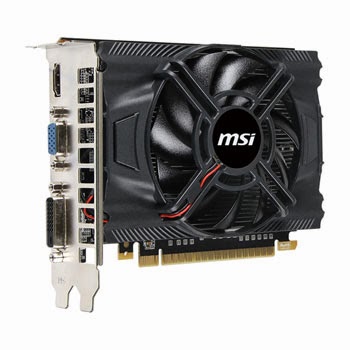
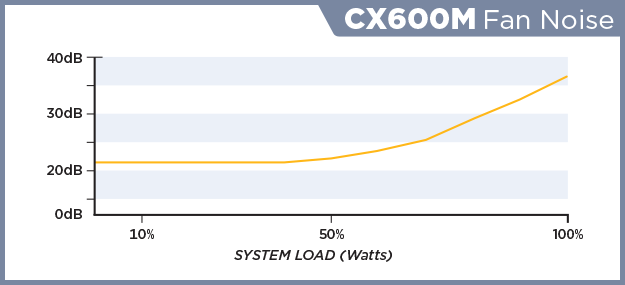
In an effort to keep noise down I've replace the stock AMD CPU cooler with a Scythe Mugen IV which seems barely audible. The only other fan in the case is in the PSU (Corsair CX600M) and on the graphics card (MSI GeForce GTX 650 N650-1GD5/OCV1), both of which were chosen as they were described as low noise. However, there is still a noticeable "hum" coming from the case which can be heard when nothing is playing. This is not a problem when media is outputting sound but it can be heard during silent parts of films which is distracting, and is certainly distracting when TV is off (PC is left running 24/7).

I'll be investigating what the culprits and attempting to decrease noise either by looking at replacement fans, or by replacing the component itself.

According to Kitguru's review of the Corsair CX600M it is barely audible until being pushed hard, which mine shouldn't be as I have the motherboard (MSI 990FXA-GD65) set to run in ECO mode, and I estimate the total power draw should be less than 50% of the PSU's capacity.


To be continued...

Thursday, 8 May 2014

Gotham!


xbmc-gotham-13_0-splash

http://xbmc.org/xbmc-13-0-gotham-rises/

The latest version of XBMC is here, and it includes improvements in efficiency on Raspberry Pi:
Since the release of Frodo a lot of effort has been put into getting XBMC to run smoother on lower powered platform like the famous Raspberry Pi and of course Android. All this effort has paid off and the experience of using these devices has become much more polished and satisfying than ever before. In particular, opening your libraries, browsing through them, loading images and starting videos have all seen dramatic speed increases

This is good news and has confirmed in my mind that putting Raspberry Pis in bedrooms to use as set top boxes is the right choice.

XBMC 13.0 and Mythbuntu 14.04 working together will hopefully be a nice straightforward set up.

More soon...