Tuesday, 10 June 2014

TBS6285 Part 2

Following on from my previous post http://ubuntulinuxhtpc.blogspot.co.uk/2014/05/tbs6285.html I've received the quad-tuner and installed it, having overcome a few hurdles. I've described the process I followed, below. If you can't get this card to work, feel free to get in touch, and I should be able to help you get up and running.


The first hurdle to overcome was installation of the linux drivers for the TBS6285. These can be downloaded from http://www.tbsdtv.com/download/. After help from Constantine, developer at Turbosight (TBS), it turned out that my motherboard (MSI 990FXA-GD65) is one of many faulty ones floating around (there is a buggy ASM1083 chip soldered between PCIe and PCI bus) which cannot handle IRQ from the card and causes an interrupt storm from the card. To overcome that I did the following (from http://www.tbsdtv.com/forum/viewtopic.php?f=52&t=7631#p24903):

1. Create a .conf file 
sudo gedit /etc/modprobe.d/tbs.conf
2. Edit contents of .conf file by inserting the following two lines and saving file
options saa716x_tbs-dvb int_type=1
options saa716x_tbs-dvb enable_ir=0 
The first line activates MSI (Message Signal Interrupts) instead of the older IRQ. The second disables remote control receiver on the card to make sure the interrupt storm is not coming from there).

3. Reboot to load the driver with MSI loaded.

Then, following intructions from http://www.linuxtv.org/wiki/index.php/TBS6285#Making_it_Work and http://www.linuxtv.org/wiki/index.php/TBS6284 with a few amendments for TBS6285 and some permissions problems, I managed to get the card working. These are the commands I used:

1. Extract the ZIP file tbs-linux-drivers_v[VERSION NUMBER].zip. As of 25 April 2014, the latest version is 140425.
unp -u tbs-linux-drivers_v140425.zip
2. Extract linux-tbs-drivers.tar.bz2 archive
cd tbs-linux-drivers_v140425 
unp linux-tbs-drivers.tar.bz2
3. Change ownership and permissions of extracted files
sudo chown -R <yourusername> tbs-linux-drivers_v140425
sudo chmod -R 777 tbs-linux-drivers_v140425 
4. Change to driver package directory
cd tbs-linux-drivers_v140425
cd linux-tbs-drivers
4.1 (If on fresh install on CentOS or similar)     
yum install kernel-devel-`uname -r`
cd linux-tbs-drivers
make clean
make distclean
 (move to Step 5)
  
5. Select platform architecture
(for any x86_64 kernel only)

enter into a terminal: 
./v4l/tbs-dvbc-x86_64.sh
and then:
./v4l/tbs-x86_64.sh
6. Build the driver. Recompiles v4l for a wide range of cards, around 500, will take many minutes.
make
        (I modify this to make -j7  to use all 6 cores of my CPU)

7. Install driver
sudo make install
8. Reboot, then
(Ubuntu-based distros only. See http://www.linuxtv.org/wiki/index.php/TBS6285#Making_it_Work for other distros)
sudo rm -Rf /lib/modules/<your kernel version>/kernel/drivers/media
9. Reinstall drivers
cd tbs-linux-drivers_v140425 
cd linux-tbs-drivers 
sudo make install
10. Load newly installed driver
sudo modprobe -v tbs62x0fe
insmod /lib/modules/3.(your kernel version)-generic/kernel/drivers/media/dvb/frontends/tbs62x0fe.ko
11. Check it loaded correctly

Reboot:
sudo shutdown -r now
After rebooting and logging back in, check to see if dvb adaptor nodes now exist:
ls -al /dev/dvb
You should see something similar to the following displayed in your terminal:
drwxr-xr-x  2 root root  120 Jul  9 21:12 adapter0
drwxr-xr-x  2 root root  120 Jul  9 21:12 adapter1
drwxr-xr-x  2 root root  120 Jul  9 21:12 adapter2
drwxr-xr-x  2 root root  120 Jul  9 21:12 adapter3
This should give you a correctly installed TBS6285 on Ubuntu 14.04 (after trials and tribulations, it did for me!)

Monday, 19 May 2014

TBS6285

Ordered a TBS6285 today.

Should arrive in a week or so.

This card, once plugged into a spare PCI slot, should allow viewing/recording of 4 different mulitplexes at the same, and can tune to 4 channels within each multiplex. So, it's technically possible to record 16 channels simultaneously with this card. I can't ever foresee the need for that, but the option to tune to 4 different multiplexes will be.

Once it arrives I'll post further updates on how I get on with using it in XMBC. I plan to do a fresh install of Mythbuntu, too, to see how it compares to XBMC as a back-end server.

Wednesday, 14 May 2014

What remote are you using with Kodi?

As mentioned in a previous post the Yatse app for Android has really impressed me and I've been using it as my main remote control for Kodi.

However, it may not be perfect for everyday use as I've regularly been running down my phone's battery, which is not ideal as it then needs plugging in to a charger, which then means it's not accessible as a remote control.

So, what is everyone using as their primary remote control for Kodi? I wonder whether the Logitech K400 keyboard is a viable alternative - it is smaller than a full size keyboard and includes a trackpad. I wonder whether it would be too unwieldy for day-to-day use though...

I've read about Logitech Harmony remotes, but am concerned about reports of button lag. Does anyone have any experience of using one of these with Kodi?

Maybe I should just nab a Microsoft MCE remote control for £20?

Please do comment on how you are connecting to Kodi.

Tuesday, 13 May 2014

Silence is Golden

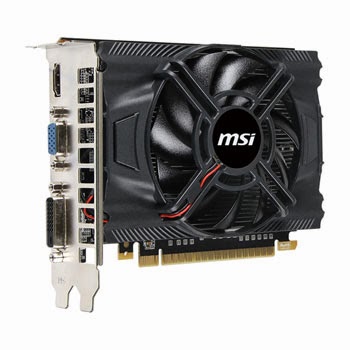
In an effort to keep noise down I've replace the stock AMD CPU cooler with a Scythe Mugen IV which seems barely audible. The only other fan in the case is in the PSU (Corsair CX600M) and on the graphics card (MSI GeForce GTX 650 N650-1GD5/OCV1), both of which were chosen as they were described as low noise. However, there is still a noticeable "hum" coming from the case which can be heard when nothing is playing. This is not a problem when media is outputting sound but it can be heard during silent parts of films which is distracting, and is certainly distracting when TV is off (PC is left running 24/7).

I'll be investigating what the culprits and attempting to decrease noise either by looking at replacement fans, or by replacing the component itself.

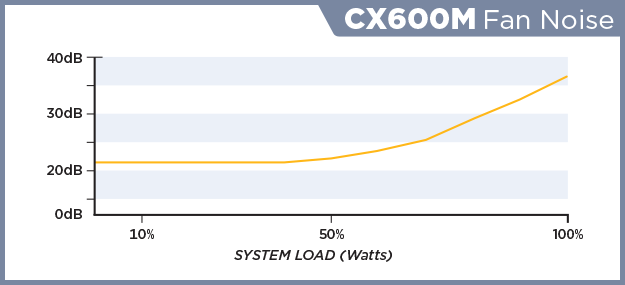
According to Kitguru's review of the Corsair CX600M it is barely audible until being pushed hard, which mine shouldn't be as I have the motherboard (MSI 990FXA-GD65) set to run in ECO mode, and I estimate the total power draw should be less than 50% of the PSU's capacity.


To be continued...

Saturday, 10 May 2014

Watch live terrestrial UK TV and catch-up TV on XBMC

As well as watching your film and listening to your music collection, XBMC's add-ons are a great way of being able to access content on the web including access to UK Freeview live TV and radio streams and catch-up TV including the BBC, ITV and Channel 4.


The process is straightforward enough, with plenty of guides on the internet, but here is one which I found really clear and easy to follow (thanks to Jamestonbradley).

Once you've added the relevant add-ons, you should be able to view UK TV (BBC content is intended to be viewed in the UK only, so if your IP address is non-UK, you may not be able to view BBC streams).

This should also give you enough practice with video add-ons to be able to search through the hundreds of other add-ons available to see if there is anything else that is of interest to you e.g. MTV music videos, IMDB movie trailers, various kids TV channels, classic movies, extreme sports, cooking, the list goes on... have a look here to see a list of some of the video add-ons available.

Friday, 9 May 2014

Yatse - XBMC/Kodi remote control app

I've been using Yatse remote control for several days now, and I'm impressed.

Yatse is an Android app which allows you to use your Android device as a smart remote control for XBMC. It stands for Yet Another Touch Screen Experiment.

The free version is very full-featured: it allows you to do what you expect i.e. control the cursor in XBMC and make selections, but also displays info on what you are watching (i.e. displays info, posters, fanart on the remote/Android device), allows you to search your media collection using your Android device, control several different XBMC devices independently of each other (all within the same WiFi zone), amongst many other things.

As mentioned, you get all this for free. There is another app from the same developer (Tolriq) called Yatse Unlocker which is £3.49 from the Play store, and this goes even further, allowing you to send your videos to XBMC, stream videos to watch on your Android device, download your media to your Android device for offline viewing.

You really do need to try it to see how slick it is. I briefly tried the official XBMC remote, but couldn't get it working. Because Yatse was so straightforward to set up and works so well, and seems to win when reviewed and compared against other remotes, I'll be sticking with it.

Thursday, 8 May 2014

Gotham!


xbmc-gotham-13_0-splash

http://xbmc.org/xbmc-13-0-gotham-rises/

The latest version of XBMC is here, and it includes improvements in efficiency on Raspberry Pi:
Since the release of Frodo a lot of effort has been put into getting XBMC to run smoother on lower powered platform like the famous Raspberry Pi and of course Android. All this effort has paid off and the experience of using these devices has become much more polished and satisfying than ever before. In particular, opening your libraries, browsing through them, loading images and starting videos have all seen dramatic speed increases

This is good news and has confirmed in my mind that putting Raspberry Pis in bedrooms to use as set top boxes is the right choice.

XBMC 13.0 and Mythbuntu 14.04 working together will hopefully be a nice straightforward set up.

More soon...